

SetlistAI Studio
Record, edit and mix your band in the browser.
A multitrack studio inside SetlistAI: record guides and arrangements track by track, program drums, build backing tracks with click and voice cues and export WAV, MP3 or stems. Nothing to install.

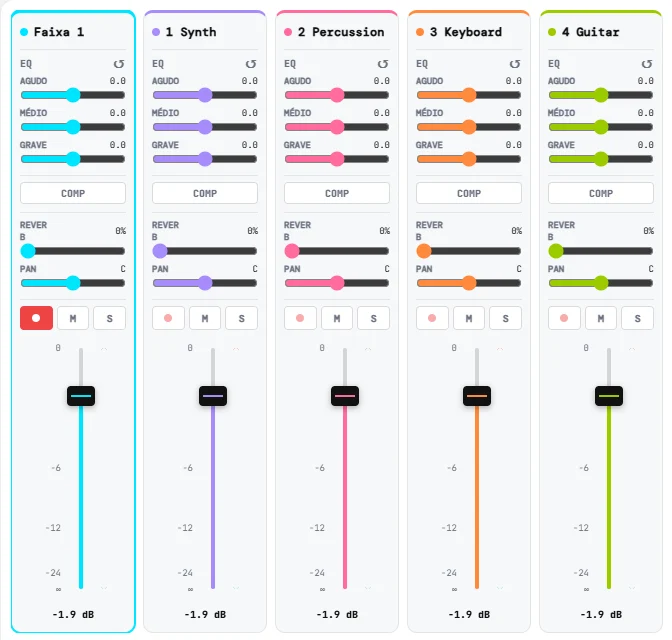
Every track gets its own console channel.
EQ, compress, add reverb and pan each track, with faders and a master. What you hear in the mixer is what goes into the file.
- 3-band EQ: high, mid and low
- Compressor and reverb on every channel
- Record, mute and solo right on the channel
Live backing tracks, without another program.
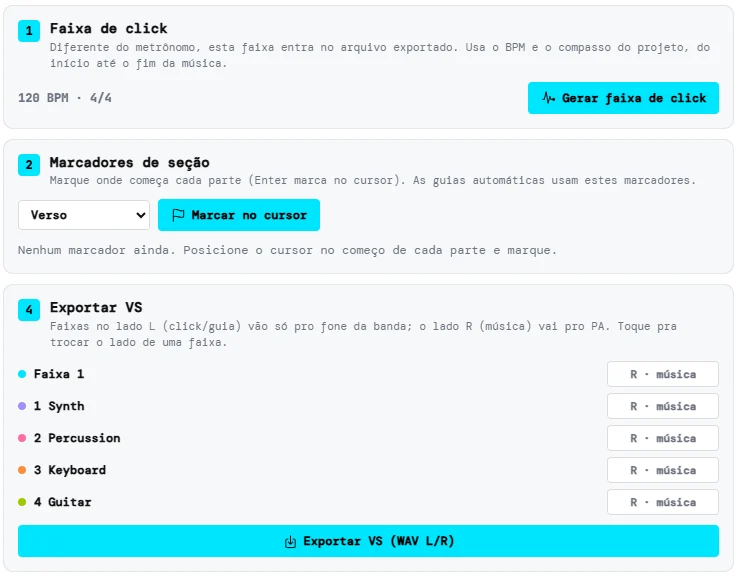
Generate a click track at the project's BPM and time signature, mark the song sections and add voice cues. Each cue comes in one bar before its section.
- Click track from the start to the end of the song
- Section markers: Intro, Verse, Chorus, Bridge, Solo and more
- Ready-made voice cues (AI-generated) in PT, EN and ES, or recorded by you

At the show, the band hears one thing and the audience hears another.
The backing track comes out as a stereo WAV with two sides. Play it from the computer or phone connected to the mixing desk and send each side somewhere else.
Band's in-ears
Click and voice cues: everyone comes in together and nobody gets lost in the song structure.
PA
The music: the tracks that fill out the band's live sound.
You choose which side each track goes to, with one tap on the backing-track screen.
What you can do
Record
- One track at a time, hearing the others
- Pick your audio interface, 1 or 2 channels
- Metronome and a 1-bar count-in before recording
- Import audio by dragging the file onto a track
Edit and mix
- Non-destructive editing: the original audio never changes
- Trim, fades, split, copy and paste, with undo
- Mixer with 3-band EQ, compressor, reverb and pan per channel
- Change key and tempo, each without touching the other
Drums and live backing tracks
- Programmable drums with 8 sounds, swing and ready-made grooves
- Click track and section markers (Intro, Verse, Chorus)
- Ready-made voice cues in EN, PT and ES, or recorded by you
- Backing-track export: click and cues on one side, music on the other
Export
- Mix to WAV or 320 kbps MP3
- Stems: one aligned WAV per track, in a .zip
- What you hear in the mixer is what ends up in the file
How it works
- 01
Open Studio
It is in the app's main menu, in the browser on your computer or phone.
- 02
Record and build the arrangement
Record guides, program the drums and mark the song sections.
- 03
Export and send it to the band
A WAV or MP3 mix, stems for whoever mixes, or a backing track ready to play live.
Good to know
Projects are saved on your device, automatically. There is no cloud copy yet.
Browsers record up to 2 channels at a time: you can record vocals and guitar together, but not the whole band on separate channels.
From guide track to backing track, in the same app as your lineup.
SetlistAI Studio is part of the Elite plan.